Yeah, that’s what I figured – and it needs to be reasonably discoverable that you can expand them back out again. I think Excel uses a || gap to show a collapsed range – along with a mouseover double-ended-arrow cursor? but that might be too subtle if that’s not a metaphor the user is familiar with.
1 Like
Well, I primarily use it for three things.
First, I use it to see which of my classes have the least amount of class XP. Mind you, they’re ALL at Level 100 and have been for a very long time, but I’m one of those people who gets bored using the same handful of meta-classes over and over again. So in those situations where I’m choosing a class for something, such as when I rotate which Hero Class is attached to my Rowanne (Explore-1/GaP and Adventure Board, among others), I’ll use Gemological to tell me which class has the least amount of XP.
Second, I use it to see which of my kingdoms are at the lowest level without having to parse the entire map, so that I know where I want to spend my crystals. I know that it would be “more efficient” to spend them on particular kingdoms that offer specific boosts, but I’m weird in this way that I simply don’t care – I find GoW to be largely very easy to begin with.
Finally, I use it to see which kingdoms have “active” tasks in certain areas, mostly pets at maximum level and troops at gold elite. It’s not quite as meaningful as it was under the pre-9.2 system, but my OCD pushes me to complete those tasks if they’re active and Gemologica is way, way, WAY easier than going through eleventy-seven kingdoms checking each in turn.
…
But I’m a certified oddball and nobody should be using my preferences and experiences as a template. For anything. 
4 Likes
Thank you everyone for the replies! It’s good to see how people are using the site. In particular, it’s good to know that features I don;t often think about, like the class display, are used by people, I’ll be sure to keep that in mind.
Small update today - just making the crystal header stay visible, and adding a small credits footer with some links.
1 Like
Thanks for the work that you do. I’d also suggest the idiom “less is more” as a precaution 
For instance for me, I feel like on the Soulforge screen, “Traitstones Always Available” list isn’t that useful.
Also it’s possible the footer or the crystal header has caused my screen to have a bottom horizontal scrollbar now on every screen.
The progress screen with Pets and Shiny Troops maybe could be moved to the far right, after the Tasks but before Preview All?
There’s a deadspace heading next to Current Tasks and that header doesnt line up over Task 1 properly, at least in the default view of the screen when I hit F5, just a little nitpick, any suggestions?

Also, the footer is covering up popups on the bottom of the screen:

1 Like
Okay, pushing an update now to fix the horizontal sizing issue, and make the tooltips avoid the footer. Will consider rearranging things… Not sure though.
4 Likes
Added a ‘wins’ column to the class section in Gemologica, so you can see how many wins you have with the class, and how many you need to unlock the class weapon. And sort by it, too, if you want to.
2 Likes
A little (well, a lot…) late, but big thanks for keeping it going!
1 Like
No worries! Glad to help. XD
1 Like
hi,
so I’ve noticed on a hover over that:

the population is telling the population growth for the next level.
Do you happen to have a global list reference somewhere I could view the numbers? I’m curious what the higher level population .. payout? may be. (maybe this is some kind of discord thing and I’m not in gems of war discord servers..)
The 9.2 deep dive has a list for population.
2 Likes
I did not know that, thank you!
Appreciate all your efforts in building/maintaining the database.
I mainly use it to track prestige levels and identify which kingdoms I want to level next when I have a handful of crystals.
I’m not sure if this info is part of the game files….but a list of troops showing release date, how released (event, campaign troop, pvp troop, monthly mythic release etc) would be amazingly helpful (no doubt, also for weapons and pets).
That sort of exists, though it’s a little hidden - open up the kingdom section and look at the very end, where the column says ‘Next’.
Had a look. That seems to be when an event is next releasing a troop from a kingdom.
I was more think something for all troops (including existing). For example, it may show that:
Name / First Release Date / Event
Vulcanus - 30th (?) Sept 2026 - Ruby Heptagon Campaign
Princess Paws - 5th Aug 2026 - Wednesday pet release
The Weeping Duchess - 15th June 2026 - PvP Season Mythic
Cultist - 7th Aug 2026 - Bounty Weekend
Etc
Maybe not possible, but I think it’d b neat for people to see when their missing troops were first released (and perhaps how that troop can now be obtained).
Ah, well, have you seen KrystaraDB? I’ve been meaning to add more links to it.
Okay, pushed an update! Added an events tab, fixed the soulforge recipes so they identify the jewels, cards, and orbs used, and eliminated some unnecessary gaps on the traitstones and achievements pages. Now I have a list of requested changes from someone, and I’m not sure about them, they involve larger changes to the way the app works. Would love some feedback on them, if anyone is interested!
There are way too many troops in the game by now, and displaying them in a hover popup is no longer very convenient. Could this be turned into a modal instead, so we could also use Chrome’s zoom feature for better readability?
I’m also not sure the list of “owned” troops needs to be visible by default, as it makes the list much more cluttered. Maybe it could be collapsed by default and expanded with a toggle instead? In that case, the popup might actually still work fine.
The same issue applies to the troop level / medals / traits lists.
For the factions, perhaps it would be worth adding the Lvl and LvlFT columns to the compact view as well?
Personally, I’d also really appreciate a separate Shiny Troops sub-page. There’s currently no way to export this data directly from my profile as a CSV for analysis, so the only option is to manually collect it kingdom by kingdom.
6 Likes
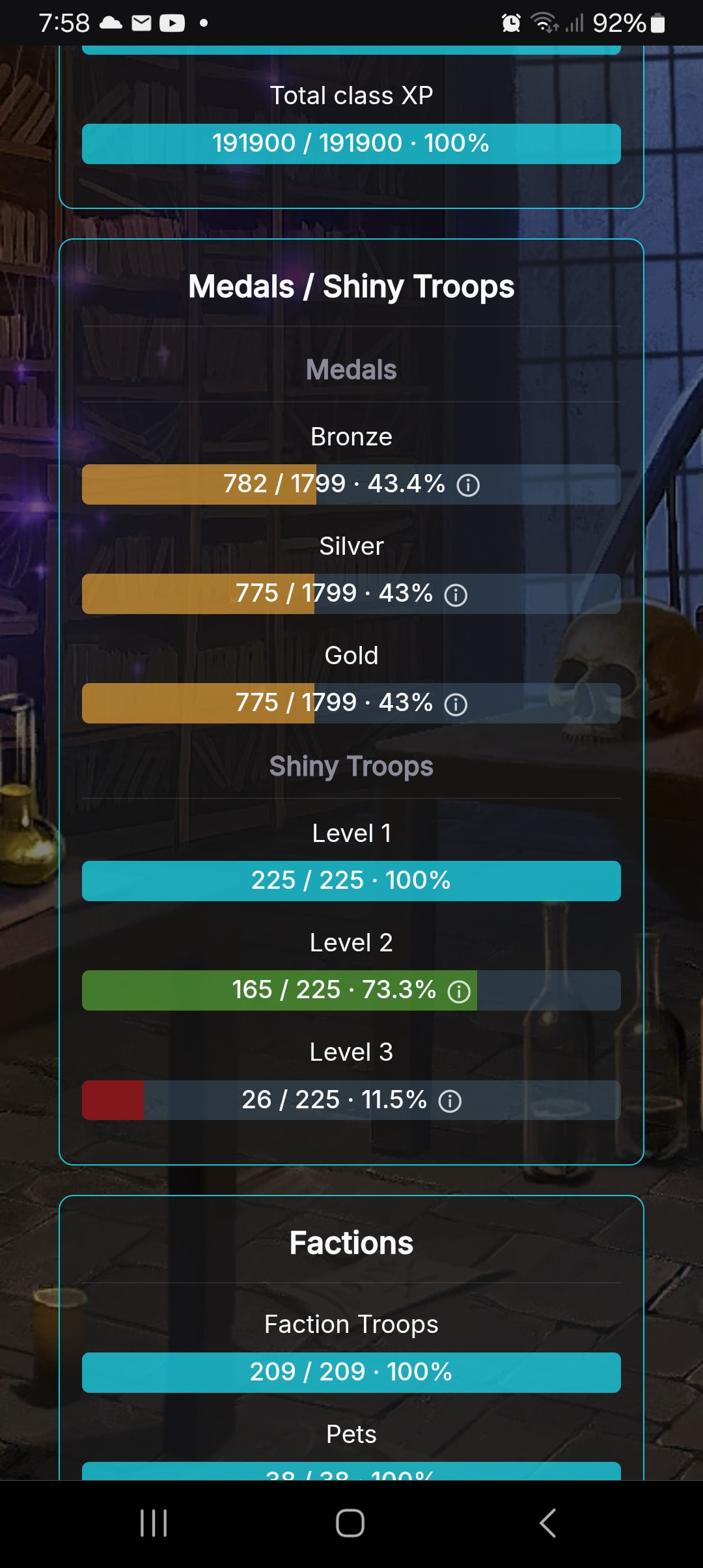
Is it possible to get Shiny Troops onto the achievement page?
Eg
How many of the shiny troops you own and which you don’t
How many at Shiny Level 1, 2 and 3
How many Shiny Tokens you’re missing (ie total shiny troops in game x 35 - those you already have)
Perhaps also a sub split….Mythic Shiny Troops shiny 1,2,3 (Similar for each rarity)
2 Likes
It’s on www.gowhead.com
1 Like
On gemologica.herokuapp.com here

Yeah - was looking for an amalgamation on the herokuapp achievement page (as the listing and tracking on the progress page is not so easy to use).
1 Like