IPhone is running iOS 27.0.1 - the latest. I updated it a few hours before updating iPad a few days ago.
1 Like
This is exactly why, as I’ve mentioned, it’s taking so long to get this fixed. Because there is nothing consistent about what devices/ios/accounts it affects.
Well, it’s consistent in that it keeps happening. I’ve deleted and re-installed the app so many times now that I’ve rote-learned the alphanumeric password.
It is not related to iOS version (as it began happening on 26.5, and still happens on the latest version 27.0.01).
It falls over somewhere between:
- ~80% of the progress bar being filled when the ‘logging on’ text is displayed; and
- Before the ‘loading assets’ progress bar would appear (when working normally).
—> so perhaps whatever handshakes etc happen during this stage should be focussed upon.
I really hope that the high number of downloads due to this issue (which would normally indicate an uptick in an apps popularity) is not somehow rewarding the studio/publisher/developers.
Meanwhile, the daily offers and Arena offers continue to include unneeded ingots, troops and forge scrolls. This was ninja changed after 9.4, and impacts the entire player base. If the devs can’t figure out the intermittent issue, then they should at least reverse the ninja change which was made after 9.4 which started these unneeded offers.
4 Likes
Still occurring daily for me with my IPad Air 2nd Gen. really kills the fun.
It’s going to continue, until we can find a fix for it. Once there is one, I’ll post it here
… what graphic settings does everyone in here use?
- Graphic Quality
- Blur Quality
- Power Saving (on/off)
- High Quality Water (on/off)
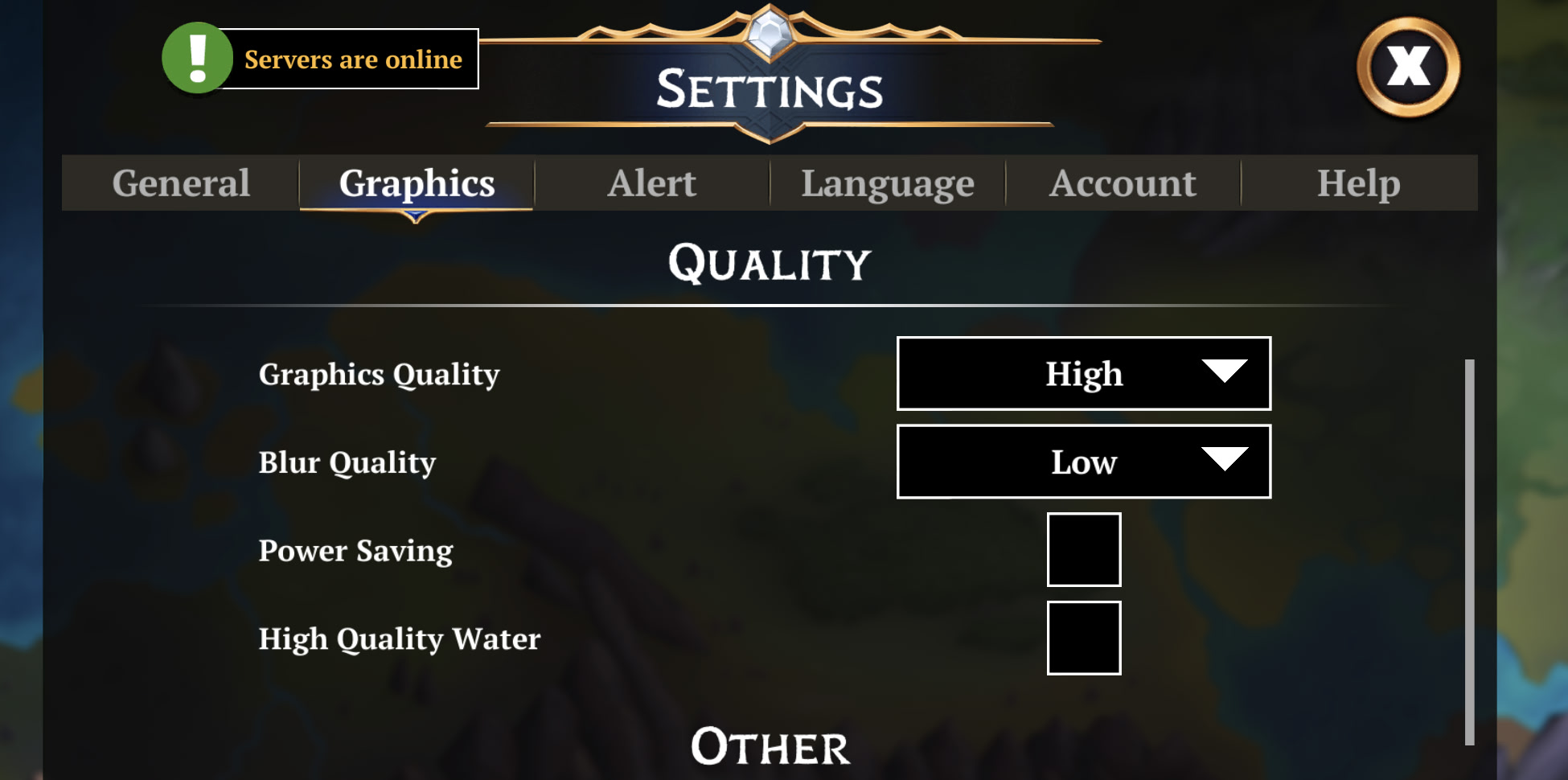
Can you put your graphics to low and lemme know how long till you can’t get back in again?
Then do low graphics and no blur, and same thing.
1 Like
I managed to go about 5 days, but the login issue has just cropped up again. My settings are exactly as shown in the screenshot. I’ve tried playing both with motion blur enabled and disabled. I try not to download all the graphic resources.
Can you also try with low graphics & no blur?
And if there is no change, then try downloading all assets

I have noticed that everytime I reinstall, the popup tells me that another 1796 megabytes of data has to be installed. so it appears that the update thst was previously downloaded is not carrying over with the relinking of my account.
I ran into a login issue. I offloaded the app, reinstalled it, and restarted my iPhone. I was able to log into the game. I set the graphics to low, disabled motion blur, and downloaded all the game resources. As soon as I closed the game, the login issue returned.
well, that rules that out then
Adding my data to help the devs narrow it down.
My iPhone mostly doesn’t get in. A bad launch looks like the castle screen flashing for 0.25-0.5 seconds, followed by the people screen, and then infinite loading.
Here is a tried and true way to get in for me:
- Offload the app in settings (as suggested above)
- Reinstall the app in settings
- Open Gems of War - get the bad loading sequence (castle screen quickly flashes)
- Force quit
- Open Gems of War again - get the good loading sequence (castle screen stays 1-1.5 seconds, then transitions to the people screen, then transitions to a kingdom and loads normally).
This seems to be 100% for me. The first load after offloading/reloading is guaranteed bad and the second load is guaranteed good.
1 Like
There was a new art build that went out today apparently, so were those steps what you were using from like.. 24 hours ago? Or from the time you posted?
Do you have a clip of the the loading in failing, with the flashing landscape?
Also, can you let me know next time you can’t get in, how long between you doing those steps and the NEXT time it happens again?
Or if you close the game and relaunch, if it immediately happens
Basically, I’m exploring LITERALLY EVERYTHING right now..
As mentioned above, apparently there was a new art build release as a “we’ll see if this is related”.. so will need to know what is happening as of now, forward..
So, not answers from what you did 4 hours ago (before this comment)
- What device (exact model information would be best) are you using
- What OS is it running
- How much free space your device have
- What has worked to get you back into the game, from now (even if temporarily)
- Reinstall, Offloading, force restart etc
- Does your Apple game account have cloud save switched on (if that’s a thing)?
- Was your account saved via cloud or did you play with an account already linked to an email? (this is generally)
- Since reinstalling, are you still using cloud save or have you switched to account recovery via email?
- If you have continued to use cloud save, does anything change when you clear your data and recover via email?
- Since reinstalling, are you still using cloud save or have you switched to account recovery via email?
- How long can you play before you can’t get back in again?
- Is it there any consistent duration, does it happen after a specific battle or time of day, etc
- And does it fail as soon as you close the game and relaunch? Or can you get in sometimes without any issues (and anything consistent about when that happens)
- Is it there any consistent duration, does it happen after a specific battle or time of day, etc
- Have you got All Assets Downloaded?
- Does anything change after downloading them all, if you didn’t already? As in, does it take longer before you get locked out again?
- Do you have notifications switched on?
- Both from within the game and in your actual device notification settings
1 Like
I don’t see a new build on iOS yet, so these steps are my existing experience.
I have a video of the failure case, but the forum says I can’t upload attachments due to being a new user (I made my forums account today).
It’s not a new build, it’s just a data push. So you wouldn’t see anything totally different, except maybe more data downloading or the option to download all assets again
And you should be able to upload now
Got it. The steps I listed above have been working before today and also worked the same today. Nothing seemed to change from my end.